The Death of Apps

Reading Time: 4 minutes

Tweetcaster spam
Tweetcaster spam

It appears that Tweetcaster has just become Spamcaster – it threw a message up on my phone telling me that I had 13 Virus[sic]. I deleted the application immediately and as a precaution checked that it was the only application from “One Louder Apps” that I had.

I’m very disappointed with “One Louder Apps”. I appreciate that all software houses have to make money (hell, we do) and I’m fine with that. I’m fine with free apps being supported by advertising. What I’m not fine with is allowing an application to be hijacked by a con. My phone does not have any viruses and the site / software I was being linked to would almost certainly install malware rather than removing it.

Anyway enough ranting. This got me thinking though about some of the less desirable near inevitabilities of app development.

In the software industry we love the app stores because the barriers to entry to this market are small. You don’t need to be a huge software house with massive resources to write some really clever and useful apps.
There’s a flip side to this coin though, if the barriers to entry for you are low then the barriers to entry for your competitors are also low. Consider the following (rather simplified) story.

You and a mate have a really cool idea for an app. You start coding it in your spare time and release an early version to the market place. It starts getting noticed. At the same time it’s noticed by customers it’s also noticed by potential competitors. They start designing similar apps, ones that have all the features yours does and a few more on top, but it’ll be a while before they get to market. So you have a golden window to make your app the best you can and get the cash in before there’s any real competition.

You’re making a bit of money out of it now though which means you can hire a couple of extra coders. So you all start hacking in features as fast as you can and the app rises in the charts, the revenue rises and everything is looking good. You buy a Porsche.

The code is suffering however from all the hacking and soon you notice that you’re having to do a lot of rework to add a feature. What’s more when you add a new person to the team your output doesn’t seem to increase by one person’s worth, more like half of a person. This is because you’re finding that you’re having to introduce procedures for things, and do documentation and all that overhead that you didn’t have to do when it was just 2 of you. But hey, the money’s flowing in, everything is rosy.

No actually, because if at this point you’re not well on the way to implementing the next killer feature then you’re screwed. Those apps that were designed after yours came to market are going to start coming online. What’s more because they designed in features that you had to hack in later they’re going to be more swish and because their code is still fresh they’re going to be able to implement new features with much less effort than you.

Even if you have got that next feature lined up you’re still in a race that you’re unlikely to win in the log run. You can’t recover your initial velocity, it’s just not possible with a hacked-to-bits code base. It’s always going to cost you more to develop anything than the newcomers to the market. With revenue falling as your market share decreases you can’t afford to throw enough people at the project to brute-force your way back to the top.

Unless you can find some way of drastically increasing your income stream it’s time to put your head between your legs and kiss your Porsche goodbye.

It’s not all doom and gloom though, there are a few ways you can combat this. Not every app / software house crashes and burns quite so pathetically.

For games especially you can release alternative versions – “in space”, “Star Wars edition” etc. that are basically the same code with a few visual tweaks. I could name several game franchises that have been able to do this very well indeed. You can even release “new” games that are substantially the same code as the old and hence don’t need that much development.

If you can use the ascent and some of the initial revenue of the first application to get a second one off the ground then as long as you keep having good ideas for apps you can keep a flow of applications. As one dies the next will become your major revenue earner.

If you use more formal development techniques from day 1 then you’re never really going to have that big burst of activity in the early phase but you’ll be able to build on what you’ve done and maintain your velocity. Competitors will come and go, your app will fluctuate in the marketplace but you stand a reasonable chance of keeping it near the top for a long period of time.

It’s quite fun to look at the successful apps and app developers in the market place and try to work out which they’re doing. Clearly the likes of Microsoft, Google, Facebook etc. are so big they’re largely irrelevant. They need to have the apps, they don’t necessarily need to make money directly from them and they can hurl seemingly unlimited resources at them if needs be.
Most of the smaller firms though you can see quite clearly what their business strategy is.
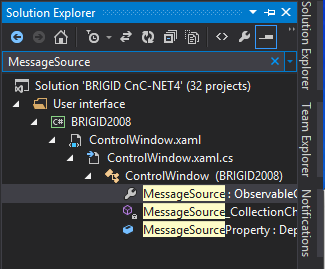

Visual Studio’s Solution Explorer “Search”

Reading Time: 2 minutes

I’m taking a leaf out of Rob Miles’ book and blogging something I found useful.

It’s perfectly simple – in Visual Studio 2013 (and I’ve noticed in 2012 also) the solution explorer has a “Search Solution Explorer” function. Initially I assumed it just found files but no, it quite happily finds properties, methods, all sorts.

Visual Studio Solution Explorer Search
VS Solution Explorer Search

There are currently 32 projects in our Command and Control solution, as I wrote much of it I know pretty much where everything is but sometimes even I get a bit lost. For new people coming onto the project it must be a real struggle. This could help enormously.

Of course, one could fire up a copy of Cygwin and grep for it, but that’s really not the point!

    find -name \*.cs -exec grep -H MessageSource "{}" \; | less

This is one of the hazards of being in the industry – the Solution Explorer in VS2005 was pretty useless (so everyone used an alternative version). At some point I will have upgraded VS and noticed that the Solution Explorer in the new version was now quite usable. I will have scanned the media on the latest VS release but either I missed or didn’t appreciate the significance of the news about the search function.

Every now and again this happens in the industry – something useful just goes flying past and you don’t realise until months or even years later.

C#’s Missing Switch(typeof(x)) and Lookup Tables of Actions

Reading Time: 3 minutes

…or how to switch on a type in C#.

There’s a method in one of Seed’s controller type classes that’s nearly 1000 lines long. How did it get like that? Well basically it’s one big if-then-else construct because C# can’t switch on the type of an object.

Steady on old chap! This article was written many years ago, as from C# version 7 it can switch on type. That doesn’t mean this technique isn’t still valuable, but it’s no longer necessary for a simple switch on type.

So that old Seed method looked pretty much like this:

if(curryObject is MasalaDosa)
{
    //a few lines of code
}else if (curryObject is VegetableThali)
{
    //a few lines of code
}else if (curryObject is TandooriMas)
{
    //a few lines of code
}
//etc. etc.

The real problem with it isn’t the fact that it’s one giant if-then-else structure it’s that each few lines of code is a few too many. It should really be more of the form:

if(curryObject is MasalaDosa)
    HandleMasalaDosa((MasalaDosa)curryObject);
else if (curryObject is VegetableThali)
    HandleVegetableThali((VegetableThali)curryObject);
else if (curryObject is TandooriMas)
    HandleTandooriMas((TandooriMas)curryObject);
//etc. etc.

Naturally you’d think you could use polymorphism to get around the problem;

HandleCurry(MasalaDosa curryObject)
{}
HandleCurry(VegetableThali curryObject)
{}
HandleCurry(TandooriMas curryObject)
{}
//etc. etc.

In reality though sometimes you can’t or sometimes it’s just more practical to use a switch type of affair. As mentioned earlier though you can’t switch on the type of an object in C# you can only switch on type if you’re using C~ version 7 or later. Alternatively you can use a lookup table (actually a dictionary in this case);

class CurryHandler
{
    Dictionary<type, action<curry="">> actionTable;</type,>

    public CurryHandler()
    {
        actionTable = new Dictionary<type, action<curry="">>
        {
            {typeof(MasalaDosa), new Action(HandleMasalaDosa)},
            {typeof(VegetableThali), new Action(HandleVegetableThali)},
            {typeof(TandooriMas), new Action(HandleTandooriMas)}
        };
    }</type,>

    public void HandleCurry(Curry curry)
    {
        actionTable[curry.GetType()](curry);
    }
    //etc. etc.

In C#, Action is a generic type that represents a method, thus Action<Curry> is a type that represents a method that takes a “Curry” as a parameter. So what we’re doing here is constructing a dictionary that links a Type to an Action.
So when we call actionTable[curry.GetType()](curry); what we’re really saying is; get the type of “curry” and look that up in the dictionary, then take the associated Action and call that method with the “curry” object as its parameter.

I rather like this pattern, once you understand it I think it’s very clear, more so than a switch statement actually because it gives you a simple reference from Type to Action, you don’t have to wade through a ton of case whatever: do_something(); break; or worse if(whatever is someType)…else if (whatever is someOtherType)…
Naturally you don’t have to use a Type as the key, you could use any object as the lookup. You can also use lambda expressions rather than declaring a bunch of new Action… but it’s all too tempting then to write code in the definition of the lookup table and make things messy and unreadable.

It’s not without problems though. As coded above though there’s no protection. If I add a new type of Curry, say DhalMakhani and call HandleCurry with that a KeyNotFoundException will be thrown. We can avoid this easily though and mimic the default: behaviour of the switch statement;

public void HandleCurry(Curry curry)
{
    Action curryAction;
    if(actionTable.TryGetValue(curry.GetType(), out curryAction))
        curryAction(curry);
    //else
    //do whatever we'd do in default:
}

//etc. etc.

I’ve also never checked how fast it is. It could be much slower than the equivalent if-then-else construct.

One possibly advantageous side effect however is that the logic has been moved out of the programming space into the data space. What do I mean by that? Well actionTable is a variable, you can change it. You can add Actions, take them away or change them at run time. This allows you to do some really clever things but should also be ringing some rather large warning bells. With great power comes great responsibility and the temptation to write code that is simply horrible to read and debug must be avoided, even if what it’s doing is really, really cool.

No doubt this is a clever technique, but it’s far from new. For my next trick I’ll explain how this basic technique can be traced back several decades into early digital electronics.

Null-Coalescing Naughtiness

Reading Time: 2 minutes

The Cat's Favourite Spot on a Dark Morning.
The Cat’s Favourite Spot on a Dark Morning.
Something struck me yesterday. Something Evil. It comes out of the fact that you can use C#’s Null-Coalescing operator – that’s ?? to most people – with reference types as well as nullable (value) types.

Most C# devs I dare say will be familiar with C#’s nullable types. They’re really System.Nullable<T> but C# allows you to use the nice shortcut of just putting a ? after the type declaration…

    class ExampleClass
    {
        int? exampleField;
        System.Nullable<int> isTheSameAsExampleField;
    }

You quite often see ?? used with examples of nullable types but it can actually be used with any reference type too. String is the most obvious[1]. For instance there’s a very common gotcha of performing some operation on a string that could actually be null. For instance,

    if(someObject.someString.Contains("SOME TEXT"))
    {

If someString is NULL (as opposed to "") this will throw a NullReferenceException

One might use C#’s guaranteed short-circuit evaluation and left-to-right evaluation to get round this

    if(someObject.someString != null && someObject.someString.Contains("SOME TEXT"))
    {

(yes I could also use String.IsNullOrWhiteSpace etc)

But it’s also possible to use the ?? operator

    if( (someObject.someString ?? "" ).Contains("SOME TEXT"))
    {

Note that although the logical result of these two options is the same the way it accomplishes that result is subtly different. In the first example if the string is null the Contains will never be executed. In the second it will be executed against the "" object (which clearly doesn’t contain "SOME TEXT"). The result in both cases is that the if condition as a whole evaluates to false, but it does so for different reasons.

…and so now here’s a way you can use these powers for evil. Let’s say you need to add something to a list, the problem is that you don’t know if the list has been instantiated yet, but if it hasn’t you need to instantiate it. This type of situation actually happens quite a lot and this solution works, ho-hum.

    List<string> list = null;
    ...some code...
    (list ?? (list = new List<string>()) ).Add("blah");

It works because C#’s assignment operator (single =) produces a result, the result is the value that was assigned. So this code says "if list is instantiated then use it for the Add. If not then instantiate a new List<string> and assign the value to list then take the result of that assignment (the newly instantiated object) and use that for the Add".

In summary then, you can use ?? against any type that could have a null value, not just System.Nullable<T>, but be careful with it because it’s a power than can be easily abused.


[1] string is actually a reference type, but it behaves like a value type

The Accidental Feature Hazard

Reading Time: 3 minutes

Plainly Not a Racing Car...
Plainly Not a Racing Car…

An accidental feature has just bitten us in the butt. I thought it worth a quick mention because it’s one of those things that happens quite often in the software industry and it’s more complex than it might first appear.

In this case it’s the ordering of a list – the customer had noticed that the list was always in a particular order. They wrote their training notes and indeed their operational procedures based around the fact that this list was always in that order.

We didn’t explicitly program the list to be in that order, we didn’t declare it as a feature that it’d be in that order, nevertheless it so happened that it was. Then we fixed a bug and as a result the ordering of the list changed slightly.

Now we have a bug report complaining that we’ve broken the list.

There are certain elements of the software development world that now would be waving their in-depth specifications at us crowing about how bad Agile is at this kind of thing and how if we’d “done it properly” then it would have been clear from the start that the list was in no guaranteed order.

They would be mockingly waving those specification documents if a) they could move them without a fork-lift and b) they hadn’t been put out of business years ago by Agile software houses like Seed.

Would it really have helped though? Perhaps – maybe the customer wouldn’t have relied on the ordering of the list or maybe they’d have spotted that it wasn’t ordered and asked for a change in the specification before the initial delivery.
Actually that isn’t so likely. Such specifications are often so complex and confusing that they never get much distribution within the customer organisation and if they do the number of people who understand them is limited (often to zero). The likelihood that the people who needed to know that the list was not in a guaranteed order actually knowing this is rather far from 100%.
Naturally there is also the risk that no matter how detailed the specification that particular detail was omitted.

So it is by no means certain that having an in-depth specification would have prevented this from happening. The only thing it is likely to do is make the contractual situation unequivocal.

That’s not the real question though, what we have to consider is what the result of us batting it back to the customer with the comment “well we never said it would do that in the first place” would be. Even with a water-tight contract such a response would have to be carefully considered.

The software industry today relies on good customer relations, repeat business and reputation. We want the customers that are using our software to continue using our software, not least because they pay an annual licence fee. Even if you’re an app developer for smartphones you have to be careful – if you annoy your customers they post bad reviews and there’s only so many bad reviews you can face down before you app dies in favour of someone else’s that has better reviews.

From a purist software development point of view this list ordering is a feature request, indeed that’s what we’ll call it internally. The relationship with the customer however is a far more complex matter – every customer tries to get at least some of their feature requests through as bugs in the hope that they’ll either get them for free or that they’ll be treated with a higher priority. If you let the customer walk all over you then you’ll be in trouble. On the other hand the age of profiteering has long passed and if the customer thinks your trying to charge them unjustly to fix genuine bugs then you could find your reputation damaged and your business will suffer as a result.

We may think of Computer Science as a logical, scientific profession but the reality of being a good software developer is that you not only need to understand logic, but you need a good grasp of politics too.

The Internet and the Office Roof

Reading Time: 6 minutesI thought I’d got away without any ill effects from the “St Jude” storm on Monday – not so. My Internet failed yesterday morning; I felt like I’d had an arm cut off.

I’m a remote worker – have been for 2 years (a fact that I really should blog more about). I knew the lack of Internet was going to cause problems but I didn’t realise exactly how much.

Tom on the office roof
Some Internet, at least!

The first thing I had to do was call the ISP to find out what was up. What’s their phone number? Well it used to be on a piece of paper under the router along with all the technical (but not security) details of the connection. The paper was missing. There’s no mobile phone signal at my address so the next image I would like to present to you is me, stood on the roof of the office at the end of the garden waving my phone in the air because if you’re really lucky on a clear day you can get some mobile signal there. Eventually I got enough mobile Internet packets to find their phone number.
Apparently the Internet problem is due to local power problems and they can’t give me a fix time because the power company won’t give them one.

No problem I say to myself – my team know what they’re doing they can survive without me as long as it’s not days. I’ll just let them know. Precisely how am I going to do this then? I’m usually pretty easy to contact, Email, Skype, MS Lync, Google Talk, SIP phone, none of which are going to work. I don’t even have any of the team’s mobile numbers. Telephone again then. The next problem is that I never actually call the Departmental Office so I don’t know the number.
That’s me on the roof of my office again waving a mobile phone around for 10 minutes trying to find the number before I realise that although Outlook won’t connect I will still have my email and the office number will be in someone’s signature – sorted.

Now down to business and for the first time I’m ahead of the game. I know I won’t be able to connect to the Team Foundation Server so I take a back-up of the source tree and then open the solution offline. The problem I’m working on is a complex one, the code didn’t make much sense – I mean I understood what it did, but what it did didn’t seem logical. I needed some context so I wondered if it had always been done like this. Usually I’d look at the module history, but that’s all in the Team Foundation Server that I don’t currently have access to.

Never mind I think, I’ll tackle a different problem, one that’s SQL Server based. Quickly I realise that I can’t remember the syntax for the OVER / PARTITION aggregate functionality. So I have a go, get it wrong and then hit F1 for some help. Which is online, so that’s a non-starter.
But I do have a book on SQL Server that I can refer to. In Safari, the online book system. That’s not going to work either.

Clearly this lack of Internet is becoming quite a problem. I am inventive though and I’ve got a spare satellite TV dish. I wonder to myself if perhaps I mount my mobile phone at the focal point of the dish and direct it at the most line-of-sight phone mast I might just get enough signal strength to tether the phone. I suspect that the answer is a strong no but maybe there is something sensible and practical I can do to improve the signal. I’ll just Google… oh wait, no I won’t.

Small scale disaster planning though is something I blogged about a while ago so I should be on top of this right? The primary backup plan for power / internet loss is to go to my in-law’s house in the nearby town. The problem is that they’re at work. My wife has a key but she’s away on business. To be honest this kind of suits me because I find laptop screens rather limiting, I far prefer the large pair of monitors I have in my office so if I can manage without Internet that’s better for me.

Nevertheless it would be good for me to get some Internet at some point, check emails, make sure the team are OK etc. The secondary backup plan is to find some public WiFi. There’s none in the village (and it wouldn’t work even if there was) so I ponder popping into the local town for lunch – the car is also away with my wife on business but the weather looks OK and I have a bicycle and a laptop backpack bag. I wonder what the weather forecast will be for later though – I’ll just look that up on the Internet… erm, no. Oh well, I can risk it, I have wet weather gear. I’m certainly not going to risk it though unless I can guarantee a cafe or coffee shop that has WiFi and I don’t remember seeing any adverts when I was last there. I’ll just Google… oh no, wait, no I won’t.

Just as I’m thinking this something pops into the back of my mind – I’m sure I remember reading when I signed up for my broadband Internet access that they had a backup dial-in option. The details of that will also be on that missing piece of paper but I remember printing it out from an email. So it’s back onto the office roof for me searching through my email history to find the details. They do indeed, but sadly it’s a national call rate number which means it would get expensive very quickly – but it was enough just to check my email.

At about 9:30pm the situation got even worse, I lost electricity as well. I live in the country where there is no street lighting. I was on the stairs and it suddenly went dark. I was prepared for this – there were torches at strategic points around the house and I got the candles and lighter out so I could find them in the dark.

What I wasn’t quite prepared for was how dark it was, it was pitch black. So I sat down with a view to waiting until my eyes picked up some light. Unusually for the house however I had my mobile phone in my pocket so a few seconds later I was carefully making my way down the stairs to one of the torches.

Electricity is another strange thing – it’s easy to overlook how important it has become to our lives.

The freezer was defrosting. As I had no idea how long I’d be without power the only thing I could do was put some towels under it and hope it wasn’t too long.

The central heating is gas, but of course the pump and all the controls are electric. Fortunately I have a multi-fuel stove which is definitely not electric in any way at all and being honest it wasn’t that cold.

Fortunately the cooker is dual-fuel, which means that the gas rings still work. It does leave me without a grill or oven though which limits what I can cook.

The house phone is a cordless model – the handset might work but the base station won’t. I keep an old fashioned corded handset just for this, so I was able to plug that in. It is worth noting that you shouldn’t assume that if you’ve got no power the phone won’t work. In reality it usually does – in the UK at least.

My alarm clock is a Lumie Bodyclock – it’s great most of the time but it is very definitely mains powered. I don’t have a mechanical alarm clock, but I do have a mobile phone so there was a solution there.

The weirdest thing though was this – it was night and I didn’t know which of the house lights were turned on and which off. This meant that if the power came back on at say 3am (which it did) some of the house lights would turn on, possibly without me knowing.

This morning I had power but still no Internet, so I’m currently sat at my in-law’s dining room table borrowing their Internet and just having to deal with the tiny laptop screen and horrid keyboard.

Being well prepared was definitely worth it – clearly I knew that losing electricity would be a serious inconvenience but just how much I rely on the Internet surprised me considerably.

C#’s IEnumerable – Two Simple Gotchas

Reading Time: 5 minutes

Dummies in suits...
Dummies in suits…

The other day I saw someone do something very much like this and it made me cringe a little. There’s no problem with this when the number of items that are being dealt with is small, but as the number of items increases performance will take a spectacular nosedive.

        static string[] composers = {"Pyotr Ilyich Tchaikovsky",
                                    "Gabriel Fauré",
                                    "Sergei Sergeyevich Prokofiev",
                                    "Jean Sibelius",
                                    "Ludwig van Beethoven",
                                    "Benjamin Britten",
                                    "Erik Satie"};


        static void Main(string[] args)
        {
            Console.WriteLine(" L I S T I N G   S H O R T   N A M E D   C O M P O S E R S");
            Console.WriteLine(" =========================================================");
            IEnumerable<string> shortComposers = composers.Where(x => x.Length < 15);
            for (int i = 0; i < shortComposers.Count(); i++)
            {
                Console.WriteLine("Composer {0} => {1}", i, shortComposers.ElementAt(i));
            }


            Console.Write(" - PRESS ANY KEY TO EXIT - ");
            Console.ReadKey();
        }

What’s the problem? Well in this trivial example nothing at all, but if the list of names were a bit longer then we could find that this code runs very slowly indeed. There are two problems.

C#’s for loop combined with IEnumerable’s .Count() method is somewhat toxic.
In order to understand why we need to look at what .NET is doing behind the scenes. Originally I used the rather excellent IL Spy to decompile part of the .NET Framework itself.
Since then Microsoft have actually published the source – so let’s take a look at what .Count() really does.

public static int Count<TSource>(this IEnumerable<TSource> source) 
{
    if (source == null) 
        throw Error.ArgumentNull("source");

    ICollection<TSource> collectionoft = source as ICollection<TSource>;
    if (collectionoft != null) 
        return collectionoft.Count;

    ICollection collection = source as ICollection;
    if (collection != null) 
        return collection.Count;

    int count = 0;
    using (IEnumerator<TSource> e = source.GetEnumerator()) 
    {
        checked 
        {
            while (e.MoveNext()) count++;
        }
    }
    return count;
}

(original here)

So if it’s a ICollection<T> or a plain ICollection it returns the Count property of the object, if not it gets the enumerator and counts up every item in the IEnumerable.

Now we have to look at C#’s for loop and how it’s evaluated. If we look at the C# 4.0 language specification it says;

A for statement is executed as follows:

  • If a for-initializer is present, the variable initializers or statement expressions are executed in the order they are written. This step is only performed once.
  • If a for-condition is present, it is evaluated.
  • If the for-condition is not present or if the evaluation yields true, control is transferred to the embedded statement. When and if control reaches the end point of the embedded statement (possibly from execution of a continue statement), the expressions of the for-iterator, if any, are evaluated in sequence, and then another iteration is performed, starting with evaluation of the for-condition in the step above.
  • If the for-condition is present and the evaluation yields false, control is transferred to the end point of the for statement.

Or in other words every time the loop goes round the Count() method is called. So if there are 1000 items in the list then the Count() method will be called 1000 times. Each time the Count() method itself is called it will get the enumerator and count up 1000. So that’s more than 1,000,000 operations that are performed when only 1000 should have been.

It’s easy to fix…

            int shortComposersCount=shortComposers.Count();
            for (int i = 0; i < shortComposersCount; i++)
            {
                Console.WriteLine("Composer {0} => {1}", i, shortComposers.ElementAt(i));
            }

Now there are 2000ish operations performed because the Count() method is only called once. Note that there is some overhead in creating the shortComposersCount variable, so for small numbers you may find that it’s faster just to leave the Count() where it was. If you do leave it as was though be aware that performance will degrade exponentially as the count increases.

.ElementAt() is inefficient
To look at the second problem let’s fire up the Dot Net Reference Source again and take a look at what .ElementAt() does.

public static TSource ElementAt<TSource>(this IEnumerable<TSource> source, int index) 
{
    if (source == null) 
        throw Error.ArgumentNull("source");

    IList<TSource> list = source as IList<TSource>;
    if (list != null) 
        return list[index];

    if (index < 0) 
        throw Error.ArgumentOutOfRange("index");

    using (IEnumerator<TSource> e = source.GetEnumerator()) 
    {
        while (true) 
        {
            if (!e.MoveNext()) 
                 throw Error.ArgumentOutOfRange("index");
            if (index == 0) 
                return e.Current;
            index--;
        }
    }
}

(original here)

Having seen what Count() does that won’t surprise you. If the IEnumerable doesn’t implement IList then ElementAt() gets the enumerator and calls MoveNext() the requisite number of times to move through to the specified position, then returns the current item. This is not good – we’re performing a whole heap of unnecessary operations and the performance drop off as the number of items increases will be horrid.

So we need a bit of a rethink – in this case simply using a foreach instead of a for fixes everything neatly.

            int i=0;
            foreach (string shortComposer in shortComposers)
            {
                Console.WriteLine("Composer {0} => {1}", i++, shortComposer);
            }

This way the enumerator is only got and enumerated once – the performance improvement of this way of doing it over the original for loop implementation will be an eyebrow-raiser.

Comparing this with an array

But what if we have to use a for loop (for some other reason)?

I won’t go into the details of the implementation of the C# array but…

  • It has a Length property (not a method) that directly returns the size of the array, it doesn’t do any counting.
  • It (obviously) has an indexer property that directly returns an item from an array – again no counting involved.

So an array also solves both of our problems…

            string[] shortComposers = composers.Where(x => x.Length < 15).ToArray();            
            for (int i = 0; i < shortComposers.Length; i++)
            {
                Console.WriteLine("Composer {0} => {1}", i, shortComposers[i]);
            }

This isn’t bad, but you must be aware that the instantiation of a new object – the array – introduces quite a bit of overhead. You may find that using this construct is slower than the original in some surprising circumstances. For instance if the item is a value type (such as a struct or string) then the overhead of creating an array of them can easily be more than the cost of doing all those extra operations. Reference types (e.g. objects) will be less prone to this.

It's not safe!
It’s not safe!
Conclusion
Be aware that a lot of LINQ operations end up iterating through item by item performing some operation or other. This fact can be hidden in innocuous looking method calls such as ElementAt(). The number of unnecessary operations can very quickly get out of hand, especially when combined with other iterative operations.

If in doubt, use the source. If you haven’t got the source for whatever you’re using then, if it’s legal to do so where you live, crank up your favourite .NET decompiler and find out what’s going on underneath.

Rocking The Black Window With mdbg.exe

Reading Time: 2 minutes

mdbg - .NET Debugger
mdbg – .NET Debugger

It’s a problem we as developers face time and time again, it works on my box but for some reason it doesn’t work on the customer’s machine and it’s not reporting anything useful in the error stream.

Maybe we could install Visual Studio on the customer’s machine and run it in debug? Maybe, probably not. Even if the customer lets you it probably involves punting significant chunks of binary around the place, a lengthy install and although Microsoft probably won’t mind as long as you uninstall it when you’re done it probably does violate your Visual Studio licence.

A much lighter alternative is to use the .NET Command Line Debugger. It’s available as part of the Windows SDK which is significantly less hassle to install than VS and far less likely to get you into trouble with the customer or with Microsoft.

The debugger is MDBG.exe and is likely to be in C:\Program Files\Microsoft SDKs\Windows\v7.1\Bin (which you might consider adding to the PATH).

—=== Edit 2013-08-30 ===—
In fact a little research indicates that you can be even more lightweight by installing the relevant parts of the Windows SDK on another box and then just copying Mdbg.exe and MdbgCore.dll to a temporary directory on the target machine.

—=== End of Edit ===—

—=== Edit 2014-11-21 ===—
In an update that could easily be decorated with the attribute [FFS] it appears that mdbg.exe is no longer part of the Windows SDK. Instead it can be found as a “sample debug program”—=== End of Edit ===—

You can load the executable you need on the command line, e.g. C:\Program Files\MyCompany\MyProduct>mdbg MyProduct.exe

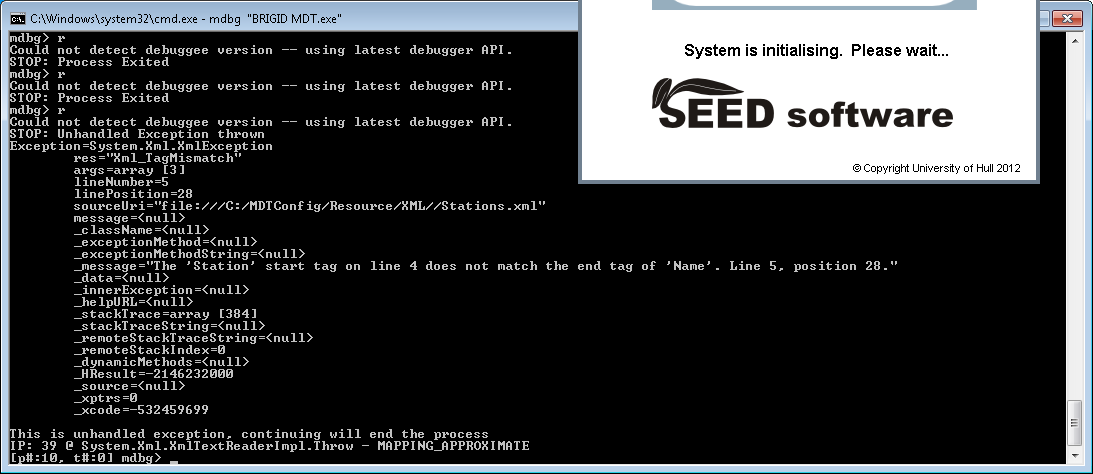
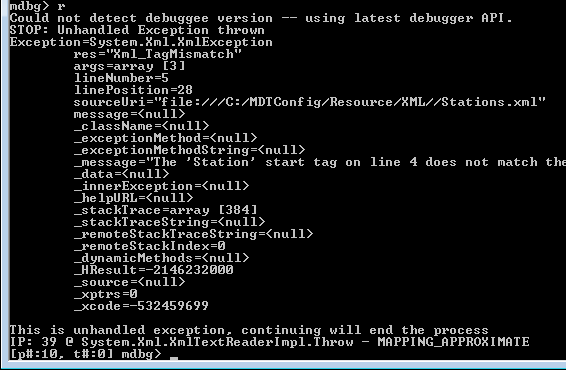
MDBG Finds the Problem

Ah, that’ll be it. I’ve made a typo in one of the XML config files. That’ll be a new item for the backlog then, “Make the app write some useful information to the error stream when some numpty screws up the XML“. It’s fine that it terminates, just not that it gives no reason for terminating.

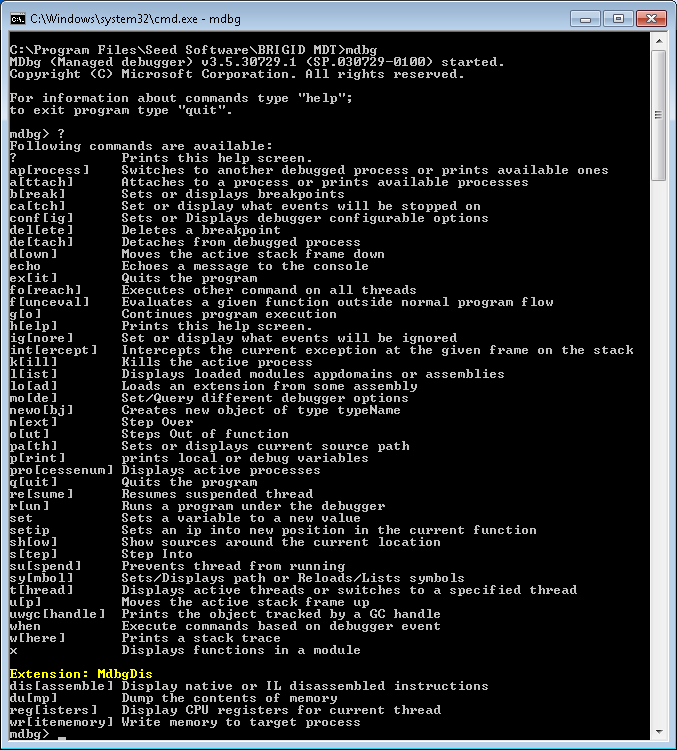
Back on topic, MDBG.exe itself is easy enough to use, it’s even good enough to list its basic usage in response to a ?

MDBG Help
MDBG Help

The Dangers of Posting Images to the Internet

Reading Time: 5 minutes

Dove St Inn Beer Festival
Geo-Tagged: Dove St Inn Beer Festival

I don’t like giving air-time to scare stories – indeed I seem to spend rather a lot of my time debunking them. I find a lot of them distasteful in attempting to use the most extreme means they can to frighten people. This American “NBC Action News” report (video) definitely falls into that category. I think I need to explain this – sensibly – without trying to frighten anyone.

The story, for those who choose not to watch, is that if you post images from your smartphone to online images services (such as flickr) you could be giving away a hell of a lot of personal information that you had no intention of making public. That information could be very useful to criminals.

Now between the ridiculous hyperbole, the desperate attempts of the newscasters to instil panic into every parent and an American “expert” who is clearly no expert at all there is actually some degree of truth behind this. Not only that but it somewhat falls into my area of expertise.

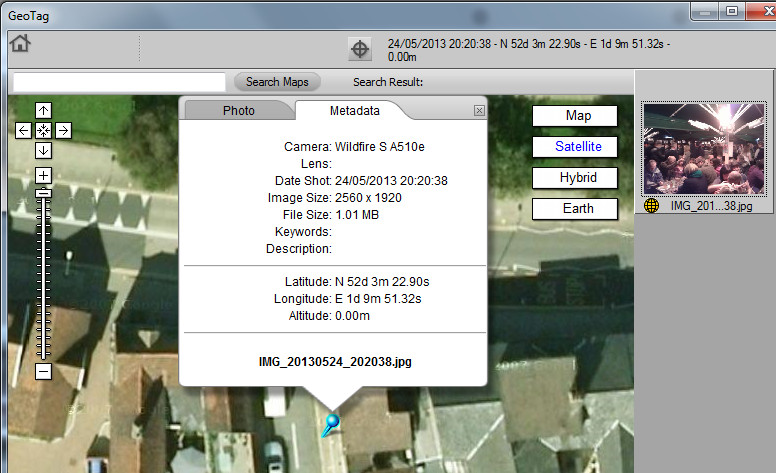
What we’re talking about is geo-tagging and it’s not new(s) – it’s been going on for years. Pretty much all smart phones and a good number of digital cameras have an option to record where and when the photo was taken (generally using GPS, the same system that sat-navs use to work out where you are). Those phones and cameras then write that information into the image itself in what’s called a geo-tag. If you post that image to an online image service then, depending on which one you use and various options etc. that information might stay in the file and it’s possible that someone viewing the file might be able to retrieve that information.

To do so – to find this information out – is in no way hacking. You don’t need to get access to any accounts or run any strange programs downloaded from dodgy darknets. Beneath is a screenshot of a free tool that came with my camera and all I’ve done is to use it on the image at the top of this page (which I’m very deliberately posting publicly).

Nikon ViewNX locates Dove St Inn

Yeah, that’s pretty much the Dove St Inn!

You could use this tool on any image that contains a geo-tag to find out when and where it was taken. This one is a few metres out – basically the wrong side of the street. That’s fairly typical. I did some experiments around my house last night however and it was possible for me to identify which room I was in when the photo was taken.

Now if it had been one of those images that I’d taken last night that I’d used in this article, rather than giving away the location of The Dove St Inn I would have given away my home address.

The amount of information you could give away like this can build up. If you post an image for which the content is clearly identifiable, or there are comments that clearly identify the place or activity then someone could quite easily build up a picture of your life. Your home address, your childrens’ schools, what parks they play in and when, when you’re away from your house, your elderly relatives houses and when you typically visit them, when you’re on holiday, etc. etc.

They could, but actually the chances that anyone is actively stalking you are pretty slim. There are billions of people out there after all. Also remember that there are quite a few ducks that have to line up for this information to be revealed and if even one of them is out of line then you won’t be publishing this information to the entire planet.

Another aspect of this is story is the fact that if the geo-tag information is in the image and that image is publicly available it can be indexed for searching. So it’s possible to search for images by their location – instead of searching for just images of kittens you could search for images of kittens within, say, 500m of a particular location. If you got any results the chances are that you’d know pretty much the house that they were at. I do find that a little concerning.

Over lunch I thought I’d give it a go – I wondered who else had posted public pictures of – or from – The Dove St Inn. So I searched flickr for “Dove” within a small area of Ipswich.

Dove St Pictures
Dove St Pictures

All perfectly innocent in this case but it proves the point – you can search for a term and find images connected with that term in a given area.

So what can we do to prevent this from happening? Essentially the message is simple, don’t post geo-tagged images to public sites unless you’re really happy about what it reveals. Your options are as follows.

  1. Turn off geo-tagging on your phone and cameras. My smartphone has an easy option in the camera app itself called “store location”. If you turn it off, the location is never stored in the image and it can never be made public.
    It is kind of handy to know when and where an image was taken though – thankfully there are other options.
  2. Make sure that you never post anything publicly. Many social networking sites and image hosting sites have privacy controls that allow you to ensure that only people you trust can see the photos.
  3. Remove the geo-tags before posting. The Nikon ViewNX utility that came free with my camera can remove geo-tags as well as view them. I bet there are smartphone apps for it too.
  4. Use an image service that has the ability to remove geo-tags of images that you’ve posted – flickr for instance has this option (under “defaults for new uploads”) and I imagine most of them do.
    If you don’t find “geo-tag” or “location data” in your privacy settings then look out for the term “EXIF” – this is the format that most smartphones and cameras use to add information such as the camera brand and exposure details as well as the location to the image file.

Personally I prefer option 2 – I tend to restrict who can view my images. I only make a few publicly available and I pay close attention to what those ones reveal, not just through geo-tags but also through the content of the image itself.

So in conclusion your smartphone is not a hot-line to the Cosa Nostra and it’s really rather unlikely that anyone with any criminal intentions is paying any attention to any images you’re posting online.
It is however worth checking if you’re posting geo-tagged images with no privacy control and if you are then have a think about whether or not you’re happy with that. If not then delete them, remove the geo-tags or make them private and then implement some sort of strategy to make sure you stop doing it.

Media Issues

Reading Time: < 1 minute

Final Year Project - What Are Those Square Things?
What Are Those Square Things?

So I was looking for something in the rack behind me in the office when I came across my final year project from my first degree. I thought it might be fun to look at the project again and I wondered if it’d still run.

I ran into a small issue though, I no longer actually own anything that can read a floppy disk. C’est la vie!